Building an Intelligent Android Automation Bot: A Deep Dive into ADB Bot with LLM Integration
A hobby project that combines Qwen 2.5 3B local LLM with Android Debug Bridge (ADB) to create a powerful automation tool that understands natural language co...
 Gemini made this. Go AI.
A hobby project that combines Qwen 2.5 3B local LLM with Android Debug Bridge (ADB) to create a powerful automation tool that understands natural language commands and intelligently controls Android devices. Built with Python 3.13.1, this project showcases advanced automation capabilities while maintaining complete privacy through local processing.
Introduction
In today’s mobile-first world, Android automation has become increasingly important for developers, testers, and power users. However, traditional automation approaches often involve complex scripting and lack intelligence when dealing with dynamic UIs or unexpected states. ADB Bot project addresses these challenges by combining the power of Local Language Models (LLMs) with Android Debug Bridge (ADB) capabilities.
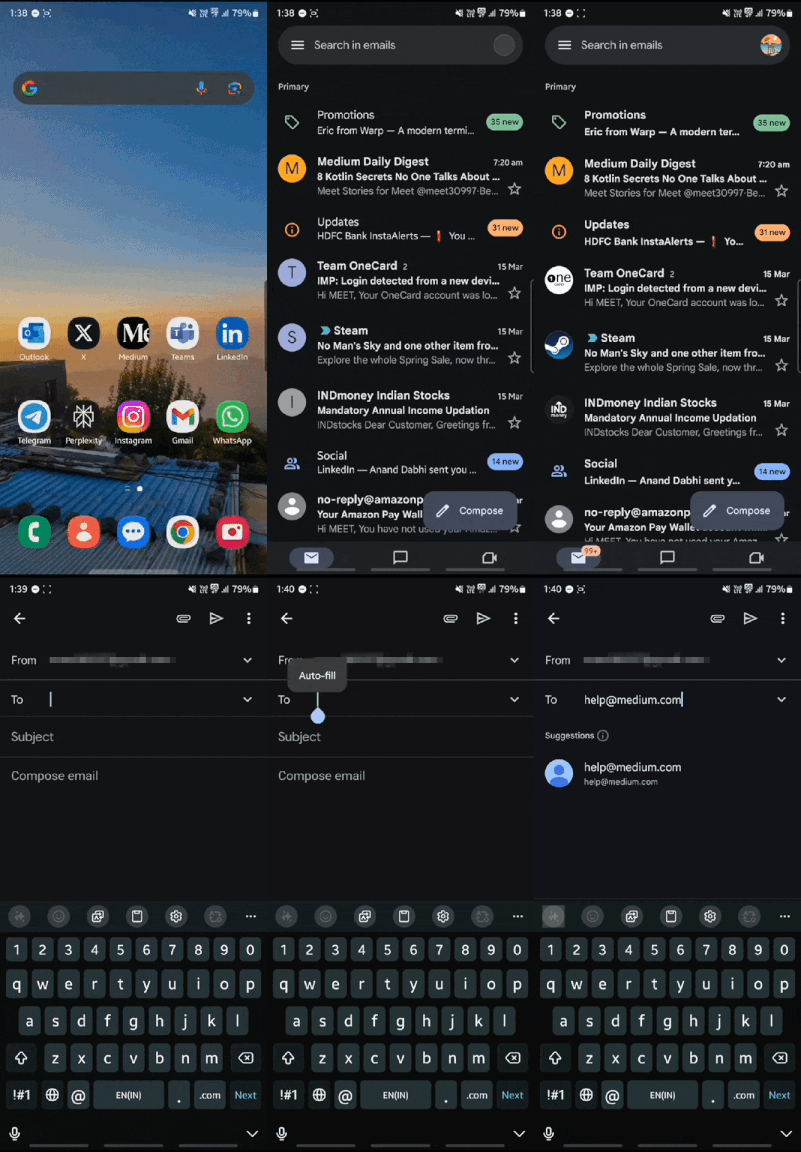
Demo
The Instruction:
open gmail and compose an email to help@medium.com
The Problem with Traditional Android Automation
Traditional Android automation faces several challenges:
- Complex scripting requirements
- Brittle UI selectors
- Poor error recovery
- Limited adaptability to changes
- High maintenance overhead
Enter ADB Bot: A Modern Solution
ADB Bot revolutionizes Android automation by introducing:
- Natural language command processing
- Intelligent UI navigation with OCR support
- LLM-powered decision making
- Privacy-focused local processing
- Smart error recovery
Project Challenges
LLM Integration
- Local model performance optimization
- Context window management for complex commands
- Structured output parsing and validation
- Error recovery strategy generation
UI Interaction
- Dynamic UI element identification
- Handling UI state changes
- OCR reliability in various conditions
- Element hierarchy navigation
Error Handling
- Intelligent recovery from failures
- State management during recovery
- Context preservation across retries
- User feedback during recovery
Performance
- Local LLM response time optimization
- UI dump parsing efficiency
- Command execution latency
- Resource utilization management
Key Features
Local LLM Processing with Qwen 2.5 3B
from adb_bot.core.llm import LLMInterface, LLMError
from httpx import AsyncClient
import json
import logging
from typing import Any, Dict, Optional

logger = logging.getLogger(__name__)

class OllamaClient(LLMInterface):
    """Interface for Ollama LLM communication."""

    def __init__(
        self,
        host: str = "http://localhost:11434",
        model: str = "qwen2.5:3b",
        timeout: int = 60 * 5
    ) -> None:
        self._host = host.rstrip("/")
        self._model = model
        self._client = AsyncClient(timeout=timeout)

    async def generate_response(self, prompt: str, temperature: float = 0.7) -> Any:
        """Generate LLM response."""
        try:
            response = await self._client.post(
                url=f"{self._host}/api/generate",
                json={
                    "prompt": prompt,
                    "model": self._model,
                    "stream": False,
                    "temperature": temperature,
                },
                timeout=60 * 5
            )

            response.raise_for_status()
            return response.json()

        except Exception as e:
            logger.error(f"LLM generation failed: {str(e)}")
            raise LLMError(f"LLM generation failed: {str(e)}")
Real-time UI Analysis
class UIDumpRetriever:
    """Retrieves and parses UI dumps from Android devices."""

    def __init__(self, adb_path: str = "adb"):
        self.adb_path = adb_path
        self._temp_dir = Path(tempfile.gettempdir()) / "adb_bot_ui_dumps"
        self._temp_dir.mkdir(parents=True, exist_ok=True)

    def get_ui_dump(self, device_id: Optional[str] = None) -> UIDumpResult:
        """Retrieves the current UI hierarchy from the device."""
        try:
            temp_file = self._temp_dir / f"uidump_{device_id or 'default'}.xml"
            cmd = [self.adb_path, "-s", device_id] if device_id else [self.adb_path]
            cmd += ["shell", "uiautomator", "dump", "/sdcard/window_dump.xml"]

            subprocess.run(cmd, capture_output=True, text=True, check=True)
            pull_cmd = [self.adb_path, "-s", device_id] if device_id else [self.adb_path]
            pull_cmd += ["pull", "/sdcard/window_dump.xml", str(temp_file)]

            subprocess.run(pull_cmd, capture_output=True, text=True, check=True)
            xml_content = temp_file.read_text()

            try:
                tree = ET.fromstring(xml_content)
            except ET.ParseError as e:
                raise UIDumpError(f"Failed to parse UI dump XML: {e}")

            logger.debug(f"UI dump retrieved: {temp_file}")
            return UIDumpResult(xml_content=xml_content, xml_tree=tree, temp_file=temp_file)

        except (subprocess.CalledProcessError, Exception) as e:
            raise UIDumpError(f"Failed to retrieve UI dump: {str(e)}")
Action Execution
class CommandExecutor:
    """Executes parsed commands using UI interactions."""

    def __init__(self, adb_client: ADBInterface, element_finder: ElementFinder, state_machine: StateMachine, action_mapper: ActionMapper) -> None:
        self._adb = adb_client
        self._finder = element_finder
        self._state_machine = state_machine
        self._action_mapper = action_mapper

    async def execute(self, actions: List[Action]) -> List[ActionResult]:
        """Executes a sequence of actions."""
        results = []

        for action in actions:
            try:
                logger.debug(f"Executing action: {action.type}")
                result = await self._action_mapper.execute_action(action)
                results.append(result)

                if not result.success:
                    logger.error(f"Action {action.type} failed: {result.error}")
                    self._state_machine.transition_to("error", action, result.error)

                    if not await self._handle_failure(action, result.error):
                        raise RuntimeError(f"Failed to recover from action failure: {result.error}")

                self._state_machine.transition_to("executing", action)

            except Exception as e:
                logger.error(f"Action execution failed: {str(e)}")
                self._state_machine.transition_to("error", action, str(e))
                raise RuntimeError(f"Action execution failed: {str(e)}")

        return results
Technical Deep Dive
Architecture Overview
The system follows a carefully designed layered architecture that separates concerns and promotes maintainability:
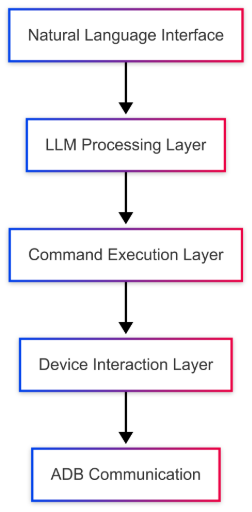
Sorry for the simple flowchart! 🙂 I didn’t have time to create a full architectural flow, but I let ChatGPT handle it anyway 🤪.
https://www.mermaidchart.com/raw/ec3928ef-d3ca-48d0-822c-32dfe62e36ea?theme=light&version=v0.1&format=svg
Let’s explore each layer with example code snippets:
1. Natural Language Interface Layer
This layer handles user input and provides a natural way to interact with the bot.
class CommandParser:
    """Parses natural language commands using LLM."""

    def __init__(self, llm_client: OllamaClient) -> None:
        self._llm = llm_client
        self._threshold = 0.7

    async def parse_command(self, command_text: str, device_context: Optional[Dict[str, Any]] = None) -> List[ParsedCommand]:
        """Parses a command and groups compatible actions."""
        if not command_text.strip():
            raise ValueError("Command text cannot be empty")

        try:
            analysis = await self._llm.analyze_command(command_text, device_context)
            confidence = float(analysis.get("confidence", 0.0))
            if confidence < self._threshold:
                raise RuntimeError(f"Low confidence ({confidence:.2f})")

            command_type = self._map_command_type(analysis.get("intent", "").lower())
            commands, idx = [], 0

            while idx < len(analysis.get("actions", [])):
                actions_group = [self._create_action_from_data(analysis["actions"][idx])]

                if idx + 1 < len(analysis["actions"]):
                    next_action = self._create_action_from_data(analysis["actions"][idx + 1])
                    if actions_group[0].action_type == "locate" and next_action.action_type in {"tap", "type", "verify"}:
                        actions_group.append(next_action)
                        idx += 1

                commands.append(ParsedCommand(
                    command_type=command_type,
                    intent=f"{analysis.get('intent', '')}_step_{idx+1}",
                    actions=actions_group,
                    parameters=analysis.get("parameters", {}),
                    confidence=confidence,
                    original_text=command_text
                ))
                idx += 1

            return commands
        except (LLMError, ValueError, Exception) as e:
            logger.error(f"Parsing failed: {str(e)}")
            raise RuntimeError(f"Parsing failed: {str(e)}")
2. LLM Processing Layer
Handles all interactions with the local LLM for decision making and command understanding.
class DecisionEngine:
    """LLM-powered decision-making engine."""

    def __init__(self, llm_client: Optional[OllamaClient] = None, confidence_threshold: float = 0.7) -> None:
        self._llm = llm_client or OllamaClient()
        self._confidence_threshold, self._retry_count, self._max_retries = confidence_threshold, 0, 3

    async def make_decision(self, context: DecisionContext) -> Decision:
        """Make a decision based on context."""
        try:
            if len(context.command.actions) == 1 and (action_type := context.command.actions[0].action_type) in {"wait", "back", "home"}:
                return Decision(
                    type=DecisionType.DIRECT,
                    actions=[Action(type=getattr(ActionType, action_type.upper()), target=None, parameters=context.command.actions[0].parameters)],
                    confidence=1.0,
                    context=context
                )

            analysis = await self._analyze_context(context)
            confidence = float(analysis.get("confidence", 0.0))
            if confidence < self._confidence_threshold:
                logger.warning(f"Low confidence ({confidence:.2f}), using fallback")
                return self._make_fallback_decision(context)

            return Decision(
                type=DecisionType[analysis.get("type", "UNKNOWN").upper()],
                actions=self._build_actions(analysis.get("actions", [])),
                confidence=confidence,
                context=context
            )
        except Exception as e:
            logger.error(f"Decision failed: {str(e)}")
            if self._retry_count < self._max_retries:
                self._retry_count += 1
                logger.info(f"Retrying decision (attempt {self._retry_count})")
                return await self.make_decision(context)
            raise RuntimeError(f"Failed to make decision: {str(e)}")
3. Command Execution Layer
Manages the queuing and execution of commands, ensuring proper sequencing and error handling.
class CommandExecutor:
    """Executes parsed commands using UI interactions."""

    def __init__(self, adb_client: ADBInterface, element_finder: ElementFinder, state_machine: StateMachine, action_mapper: ActionMapper) -> None:
        self._adb = adb_client
        self._finder = element_finder
        self._state_machine = state_machine
        self._action_mapper = action_mapper

    async def execute(self, actions: List[Action]) -> List[ActionResult]:
        """Executes a sequence of actions."""
        results = []

        for action in actions:
        ...
4. Device Interaction Layer
Handles direct interaction with the Android device through UI analysis and element manipulation.
class ActionMapper:
    """Maps and executes UI actions."""

    def __init__(self, adb_client: Optional[ADBInterface] = None) -> None:
        self._adb = adb_client
        self._action_map = {
            ActionType.LOCATE: self._locate_element,
            ActionType.TAP: self._tap_element,
            ActionType.SWIPE: self._swipe_gesture,
            ActionType.TYPE: self._type_text,
            ActionType.BACK: lambda *_: self._adb.press_back(),
            ActionType.HOME: lambda *_: self._adb.press_home(),
            ActionType.WAIT: self._wait_for,
            ActionType.VERIFY: self._verify_state,
        }

    async def execute_action(self, action: Action) -> ActionResult:
        handler = self._action_map.get(action.type)
        if not handler:
            return ActionResult(False, action, error=f"Unknown action: {action.type}")
        try:
            logger.debug(f"Executing {action.type} on {action.target}")
            return ActionResult(True, action, details=await handler(action.target, action.parameters))
        except Exception as e:
            logger.error(f"Action failed: {str(e)}")
            return ActionResult(False, action, error=str(e))

    async def execute_sequence(self, actions: List[Action]) -> List[ActionResult]:
        results = []
        for action in actions:
            result = await self.execute_action(action)
            results.append(result)
            if not result.success:
                break
        return results

    async def _locate_element(self, target: str, params: Dict[str, Any]) -> Dict[str, Any]:
        if not target:
            raise ValueError("No target for locate action")
        from ..ui.xml_parser import XMLParser
        from ..ui.element_finder import ElementFinder
        ui_hierarchy = XMLParser().parse(await self._adb.get_ui_dump())
        element = ElementFinder().find_element(ui_hierarchy, target, False)
        if not element:
            raise ValueError(f"Element not found: {target}")
        return {"element": element, "bounds": element.bounds, "clickable": element.clickable}

    async def _tap_element(self, target: str, params: Dict[str, Any]) -> Dict[str, Any]:
        element = (await self._locate_element(target, params))["element"]
        x, y = element.bounds.center()
        await self._adb.tap(x, y)
        return {"coordinates": (x, y), "bounds": element.bounds.__dict__}

   ....
5. ADB Communication Layer
Provides reliable communication with the Android device through ADB.
class ADBClient:
    def __init__(self, device_id: Optional[str] = None):
        self.device = device_id
        self.connection = None
        self.retry_policy = ExponentialBackoff()

    async def execute_shell_command(self, command: str) -> str:
        try:
            return await self._execute_with_retry(
                lambda: self.connection.shell(command)
            )
        except ADBError as e:
            await self.error_handler.handle_adb_error(e)
            raise

    async def capture_ui_hierarchy(self) -> str:
        # Capture current UI state
        return await self.execute_shell_command('uiautomator dump')
Intelligence Layer
The LLM integration provides:
- Command understanding and decomposition
- Context-aware decision making
- Error recovery suggestions
- Pattern learning capabilities
Privacy-First Architecture
Unlike cloud-based solutions, ADB Bot prioritizes privacy:
- Uses Ollama for local LLM processing
- Performs OCR locally
- Keeps all device data on-premises
- No external API dependencies
Smart Error Handling
One of ADB Bot’s standout features is its intelligent error handling and recovery system:
Error Detection and Analysis
class LLMError(Exception):
    """Base exception for LLM-related errors."""
    pass

class ConnectionError(LLMError):
    """Exception raised when Ollama server connection fails."""
    pass

class ModelNotLoadedError(LLMError):
    """Exception raised when model is not loaded."""
    pass
Recovery Strategy Generation
async def _handle_failure(
    self,
    failed_action: Action,
    error: str
) -> bool:
    """Handle action failure and attempt recovery."""
    try:
        # Get recovery decision from state machine
        decision = self._state_machine.handle_error(
            error,
            {}  # Current state context
        )

        if not decision:
            return False

        # Execute recovery actions
        logger.info(f"Attempting recovery with {len(decision.actions)} actions")
        recovery_results = await self._action_mapper.execute_sequence(
            decision.actions)

        # Verify recovery success
        return all(r.success for r in recovery_results)

    except Exception as e:
        logger.error(f"Recovery failed: {str(e)}")
        return False
Technical Challenges and Solutions
**Context Window Management
**The challenge was to efficiently manage the context window for processing complex commands while ensuring accurate token counting. This was addressed by implementing a dynamic calculation method that selects the optimal context size based on precise token estimation, incorporating a safety buffer to handle JSON and technical content effectively.
def _calculate_context_window(self, prompt: str) -> int:
        """Calculate the optimal context window size based on accurate token counting."""
        try:
            # Initialize the GPT-4 tokenizer which handles code/JSON well
            encoder = tiktoken.get_encoding("cl100k_base")  # GPT-4 encoding

            # Get accurate token count
            token_count = len(encoder.encode(prompt))

            # Apply safety buffer (20% for JSON/technical content)
            estimated_tokens = int(token_count * 1.2)

            # Standard context sizes available
            base_sizes = [2048, 4096, 8192, 16384, 32768, 65536, 131072]

            # Find the smallest context size that can handle our tokens
            for size in base_sizes:
                if size >= estimated_tokens:
                    print(
                        f"Calculated {token_count} tokens, with buffer: {estimated_tokens}, using context size: {size}")
                    return size

            print(
                f"Token count {token_count} exceeds standard sizes, using maximum context")
            return 131072

        except Exception as e:
            print(
                f"Error in token calculation: {e}, falling back to basic calculation")
            # Fallback to basic calculation if tokenizer fails
            word_count = len(prompt.split())
            # More conservative multiplier for fallback
            estimated_tokens = int(word_count * 2)

            for size in [2048, 4096, 8192, 16384, 32768, 65536, 131072]:
                if size >= estimated_tokens:
                    print(
                        f"Using fallback calculation - estimated tokens: {estimated_tokens}, context size: {size}")
                    return size

            return 131072
**Prompt To Produce Structured Output
**The challenge was to generate structured and reliable action sequences from natural language commands for an Android automation bot. To achieve this, a prompt was designed to enforce a strict JSON output format, ensuring the command is fully parsed into a sequence of actionable steps with high accuracy and completeness.
prompt = f"""You are a command parser for an Android automation bot. Analyze the following command and return ONLY a JSON object without any explanation or additional text.

Command: {command}
Device Context: {context_str}

Your task is to generate a COMPLETE sequence of actions needed to execute the command. Commands typically require multiple actions (locate, tap, swipe, etc.) to complete successfully.

First, consider the steps needed to execute this command. Think about:
1. What app needs to be opened
2. What UI elements need to be interacted with
3. What information needs to be entered
4. What actions need to be taken in sequence to complete the command

How to choose taret element for action:
- Use the target element name from the UI hierarchy.
- Find the most specific element that can be used to perform the action.
- Next task will be highly dependent on the target element you choose. so choose wisely.

Then, generate a JSON object using the schema below:
- intent: a string representing the command intent.
- actions: a list of ALL action objects needed to complete the task, each with:
    - type: a string (one of "locate", "tap", "swipe", "type", "back", "home", "verify", "wait")
    - target: a string indicating the target element based on UI hierarchy.
    - parameters (optional): an object with additional details.
- parameters: an object with command-specific details.
- confidence: a number between 0 and 1 representing confidence.

Here are examples of commands and their complete action sequences:

{examples_str}

IMPORTANT: Your output MUST be a complete, valid JSON object without any explanations or text before or after. Make sure to include all closing brackets and braces. Review your output before submitting to ensure it's complete and valid JSON.

CRITICAL: Any Syntax errors or missing fields will result in a failed test.
"""
        return prompt
State Synchronization:
The challenge was to ensure that the UI accurately reflects the application’s state by tracking changes efficiently. To solve this, a state synchronization mechanism was implemented, storing historical states and updating only when significant changes occur to optimize performance.
class UIStateTracker:
    def __init__(self):
        self.current_state = {}
        self.state_history = []
        self.last_update = time.time()

    async def update_state(self, new_state: Dict[str, Any]):
        if self._has_significant_changes(new_state):
            self.state_history.append(self.current_state)
            self.current_state = new_state
            self.last_update = time.time()
**Element Finding Strategies
**The challenge was to develop a robust element-finding strategy that efficiently identifies target elements based on varying levels of textual similarity. To address this, a hierarchical approach was implemented, starting with exact matches, followed by token-based, fuzzy, and hybrid matching techniques to improve accuracy and flexibility.
class MatchStrategy(Enum):
    """Element matching strategies."""
    EXACT = "exact"          # Exact text/id match
    TOKEN = "token"          # Token-based matching
    FUZZY = "fuzzy"         # Fuzzy text matching
    HYBRID = "hybrid"       # Combined approach
# Try exact matches first
    logger.debug("Trying exact matches...")
    matches = self._find_exact_matches(elements, target, target_tokens)
    if not matches:
        # Try token matches
        logger.debug("Trying token matches...")
        matches = self._find_token_matches(elements, target_tokens)
    if not matches:
        # Try fuzzy matches
        logger.debug("Trying fuzzy matches...")
        matches = self._find_fuzzy_matches(elements, target)
Limitations
1. Limited Resources
- Computing Power & Memory: Running a large AI model (LLM) on your own computer needs a strong CPU/GPU and enough RAM.
2. Speed & Real-Time Response
- Processing Time: Running the AI locally cause delays, especially for difficult tasks.
- Android Device Response: Android may not always respond quickly or consistently, slowing down automation.
3. Complex Integration
- Connecting Systems: Making AI, ADB (Android Debug Bridge), and middleware work smoothly requires a well-designed system.
- Errors: If AI misunderstands something, it could send the wrong or even unsafe commands. Safety checks are needed.
4. Limited Knowledge of Android
- Understanding Android Automation: The AI may need extra training to work well with Android tasks.
- Unpredictable Issues: Some devices may behave differently, and the AI might not know how to handle them.
Conclusion
What started as a simple hobby project has evolved into an exciting exploration of the intersection between AI and Android automation. ADB Bot not only showcases the power of local LLMs like Qwen 2.5 3B but also opens doors to new possibilities in intelligent device control.
As I dive deeper, I realize this approach could revolutionize mobile automation — enabling smarter workflows, hands-free interactions, and even adaptive UI modifications. With privacy, flexibility, and expandability at its core, this is just the beginning of what AI-powered automation can achieve.
Building a truly scalable solution is a long journey, requiring continuous refinement, optimization, and adaptability. However, this is the crucial first step toward a future where AI-driven automation seamlessly integrates into our daily mobile experiences.