Agent Workflows for Vibe Coding: Idea to Product Guide
Learn how agent workflows, rules, context files, and review loops turn AI vibe coding into a reliable path from idea to product.
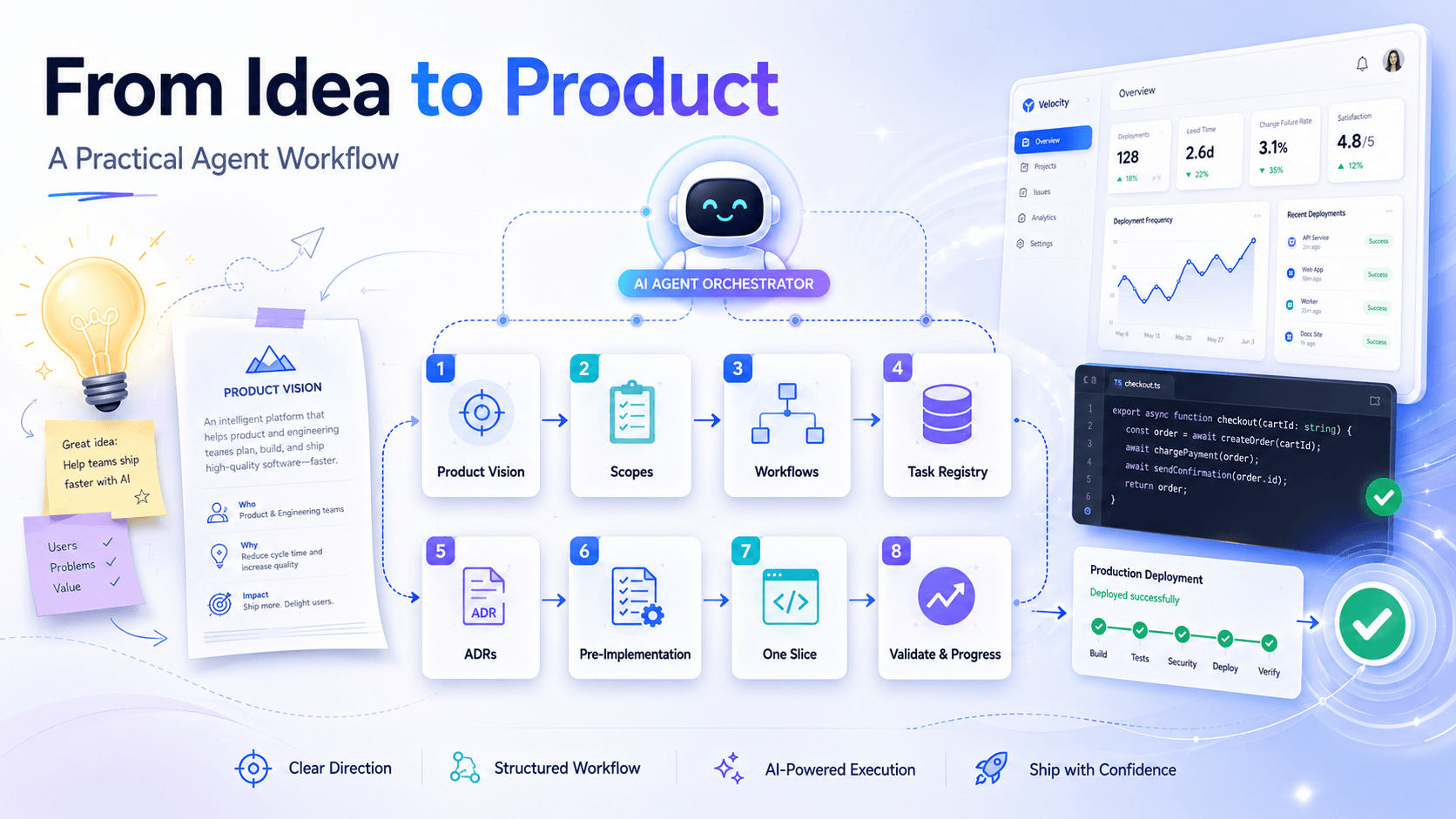
Agent workflows are the rules, context files, task systems, and review loops that guide AI coding agents while they build software. In agent-powered vibe coding, they turn a raw idea into a repeatable development process: define the product, choose the right scope, load the right context, implement one slice, validate it, and record what changed.
Without a workflow, vibe coding can produce impressive demos but messy products. With a workflow, AI coding agents can help founders, developers, and product teams move from idea to product with more speed, consistency, and control.
Key Takeaways
- Agent-powered vibe coding works best when creativity is paired with clear engineering rules.
- A strong workflow tells the AI coding agent what to read, what to change, what to avoid, and how to verify the result.
- Scope rules prevent frontend, backend, and shared-schema changes from bleeding into each other.
- Context files give the agent product memory across sessions.
- Task registries turn a big product idea into small, dependency-aware implementation steps.
- Architecture decision records protect important technical and product choices.
- Self-review checklists make AI-generated code more reliable before it reaches users.
What Is Agent-Powered Vibe Coding?
Agent-powered vibe coding is a development style where a human describes product intent in natural language and an AI coding agent performs much of the implementation work. The human guides the direction, taste, constraints, and priorities. The agent reads the codebase, edits files, runs checks, and explains the result.
Instead of manually writing every line, a builder might ask an agent to:
- Build an onboarding flow for a SaaS product.
- Add an API endpoint for AI-generated content.
- Create a dashboard screen that follows the design system.
- Connect a shared validation schema to a frontend form.
- Review a feature for bugs, regressions, and missing tests.
The "vibe" is the fast product direction. The "agent-powered" part is the execution. The workflow is what keeps both from drifting.
Why Agent Workflows Matter
Agent workflows matter because AI coding agents need boundaries, memory, and quality checks. A good workflow helps the agent understand the active task, respect architecture decisions, limit file changes, use the right implementation patterns, and validate the finished work.
Raw AI coding can be fast, but it often lacks continuity. An agent may skip relevant docs, invent patterns, touch unrelated files, or solve a narrow problem in a way that conflicts with the wider system. That risk grows when a product is being built from scratch because early decisions become foundations.
For example, if the first version of a product uses shared schemas for validation, the agent should not create separate frontend-only validation rules later. If the product requires human approval before an AI-assisted action is executed, the agent should not add an autonomous execution path because it seems convenient.
Workflows protect those choices.
The Core Parts of a Strong Agent Workflow
A useful agent workflow answers the same questions a senior engineer would ask before making changes:
- Which part of the system owns this request?
- What context is required before implementation?
- Which task is active?
- Which documentation applies?
- Which architecture decisions must be respected?
- What files are allowed to change?
- What tests, checks, or manual reviews are required?
- How should progress be recorded?
The goal is not to slow the agent down. The goal is to give the agent enough structure to move quickly without creating hidden cleanup work.
Scope Rules Keep AI Coding Agents Focused
Scope rules tell an AI coding agent where a request belongs. This is one of the simplest and most valuable rules in agent-powered software development.
A practical product might split work into:
- Frontend: pages, components, styling, routing, forms, and client-side UX.
- Backend: APIs, database access, authentication, queues, jobs, and integrations.
- Shared package: reusable types, schemas, validation rules, and constants.
- Documentation: product vision, architecture notes, workflow rules, and decision records.
Clear routing rules prevent accidental cross-system edits. A UI task should not casually rewrite API contracts. A schema task should identify which apps consume that schema before changing it. A backend task should not patch frontend behavior to hide a data modeling issue.
This kind of scoping gives the agent a first decision: "Where should I work?"
Context Files Give the Agent Product Memory
Context engineering is the practice of giving an AI agent the right information at the right time. For coding agents, context files are the product memory layer.
Useful context files include:
current.mdfor the active task, assumptions, blockers, and implementation declaration.tasks.mdfor the task registry, priorities, statuses, and dependencies.progress.mdfor completed work, validation notes, and deviations.decisions/for architecture decision records, also known as ADRs.docs/for product vision, frontend design, backend design, and system behavior.
This matters because chat history is not a dependable source of product truth. A well-maintained context folder lets the agent continue across sessions, understand what is already complete, and avoid repeating settled discussions.
When you are starting something from scratch, this memory is a multiplier. The first few days of a product often define the framework, routing model, auth strategy, database shape, validation layer, design direction, and MVP boundaries. Those decisions should be written down before they become scattered across prompts.
Task Registries Turn Ideas Into Product Roadmaps
A big idea is not a task. "Build an AI operations platform" or "create an internal automation tool" is too broad for safe implementation in one pass.
A task registry turns that ambition into ordered slices:
- Project setup
- Authentication
- Onboarding
- Business profile
- Account connections
- Content generation
- Preview and editing
- Scheduling
- Publishing
- Analytics
- Recommendations
Each task should include an ID, status, priority, category, dependencies, and notes about whether the frontend, backend, or shared schema is involved.
This structure helps the agent choose the next valid task instead of jumping to whatever sounds exciting. It also prevents duplicate work. If signup is already complete, the agent should not rebuild signup because a later prompt mentions it. It should read the task state, detect completion, and move to the next dependency-ready item.
File Budgets Reduce Risk
A file modification budget limits how many files an agent can change for a task unless it records a scope escalation. This is a practical rule for reducing blast radius.
Agents can sometimes over-solve. A dashboard task becomes a design-system refactor. A small validation fix becomes a new API pattern. A copy update becomes a component rewrite.
A file budget creates useful friction. It asks the agent to identify the minimum necessary files before editing. If more files are required, the agent must explain why the scope expanded.
For product teams, this makes review easier. Small, focused changes are easier to understand, test, and ship. They also compound better than broad edits that mix multiple ideas into one patch.
Architecture Decision Records Protect Product Consistency
Architecture decision records are short documents that capture important choices and the reasoning behind them. In agent-powered vibe coding, ADRs are especially useful because they give the AI agent durable rules to follow.
Examples of decisions worth recording include:
- Which framework and routing model the frontend uses.
- Which backend architecture the API follows.
- How authentication tokens are stored.
- Whether shared schemas are the source of truth for validation.
- Which database and ORM are used.
- Whether AI-generated content requires human approval.
- How retries avoid duplicate external actions.
ADRs keep the product coherent. If the system has decided to use shared schemas, future work should extend those schemas instead of inventing parallel types. If sensitive actions must be approval-based, future features should preserve that safety rule.
This does not mean decisions can never change. It means changes should be intentional and documented.
Skills Help Agents Handle Specialized Work
Agent skills are focused instruction files for specific types of work. They can teach an agent how to approach frontend design, Next.js patterns, form validation, API modules, database migrations, accessibility, testing, or SEO content.
The best workflows do not load every skill every time. They select the skill that matches the task.
For example:
- A frontend screen task may use a design-system skill.
- A form task may use a validation skill.
- A backend endpoint task may use an API architecture skill.
- A blog optimization task may use an SEO content skill.
This keeps the agent focused. Too much context can make the output less precise. The right skill at the right moment improves quality without overwhelming the agent.
Self-Review Turns AI Output Into Shippable Work
AI-generated code should be reviewed before it is treated as complete. A self-review checklist helps the agent catch issues before handing the work back.
A strong checklist includes:
- The active task requirements are fully addressed.
- Modified files stay within the declared file budget.
- Every changed file was part of the implementation plan.
- No unrelated dependency was introduced.
- Architecture decisions were respected.
- Existing tests pass, or new tests cover the changed behavior.
- No placeholder, TODO, or FIXME remains without a tracked follow-up task.
- Progress and task status are updated when the workflow requires it.
This review loop separates "the agent produced code" from "the product moved forward." That difference matters.
From Idea to Product: A Practical Agent Workflow
To start developing something from scratch with AI coding agents, use a workflow that moves from product clarity to small validated implementation slices.
1. Write the Product Vision
Define the audience, problem, promise, MVP scope, non-goals, and safety constraints. Avoid vague prompts like "build an AI app." Write down who it serves, what pain it solves, what the first version must include, and what the first version must avoid.
2. Split the Product Into Scopes
Separate frontend, backend, shared schemas, infrastructure, and documentation. Then write routing rules so the agent knows which workflow applies to each request.
3. Create App-Specific Workflows
Frontend and backend work have different risks. Frontend workflows should emphasize UX, accessibility, responsive behavior, and component consistency. Backend workflows should emphasize data integrity, authorization, validation, idempotency, and tests.
4. Build a Task Registry
Convert the vision into dependency-aware tasks. Give each task an ID, priority, category, status, and dependency list. This creates a roadmap the agent can follow across sessions.
5. Document Architecture Decisions
Record decisions early: auth strategy, data model, validation approach, AI provider abstraction, deployment shape, and product safety rules. Early decisions are the ones most likely to shape everything that follows.
6. Require a Pre-Implementation Declaration
Before editing files, ask the agent to declare the selected task, required files, file budget, relevant docs, relevant ADRs, selected skill, and assumptions. This makes the work inspectable before code changes begin.
7. Implement One Complete Slice
Do not ask the agent to generate the entire product at once. Ask for one route, one endpoint, one schema, one flow, or one integration. Small slices create momentum without losing control.
8. Validate and Record Progress
Run available checks, fix issues, summarize what changed, and update task history. The record should explain what was built, what was validated, what assumptions were made, and what remains.
Rules Are Not the Opposite of Vibe Coding
Rules do not kill the vibe. They protect it.
Without rules, the human spends too much time correcting drift, restating context, and cleaning up accidental complexity. With rules, the agent can move faster because it understands the product boundaries.
The best human-agent loop looks like this:
- The human defines product intent.
- The workflow defines operating rules.
- The agent implements the next slice.
- The checks verify quality.
- The context files preserve memory.
- The human makes final product decisions.
That is where agent-powered vibe coding becomes more than a prototype trick. It becomes a repeatable way to build.
Common Mistakes in Agent-Powered Vibe Coding
The biggest mistake is treating the agent like a one-shot code generator. That can work for demos, but it breaks down when the product needs consistency.
Avoid these common mistakes:
- No product vision.
- No scoped workflow.
- No task registry.
- No architecture decision records.
- No file modification budget.
- No design or implementation rules.
- No validation loop.
- No progress history.
- Too much context loaded at once.
- Too many unrelated files edited in one task.
- Shipping AI output without human review.
The fix is not to slow everything down. The fix is to make the agent's path clearer.
Reference Workflow
Here is a complete example of an implementation agent workflow that defines task selection, scoped context loading, pre-implementation declarations, file budgets, skill selection, self-review, and progress updates.
# Implementation Agent — Backend (apps/api)

You are the implementation agent for the **backend** application (`apps/api`).

---

## Execution Process

Follow these steps in exact order:

**Step 1** — Read `apps/api/context/current.md`

**Step 2** — Read `apps/api/context/tasks.md`
Select the active task using rule 1.2.
If `current.md` already has an IN_PROGRESS task, that task takes precedence over `tasks.md` selection.

**Step 3** — Read `apps/api/docs/INDEX.md` only (not the full docs folder)

**Step 4** — Identify the active task's category from `tasks.md` or `current.md`.
In `INDEX.md`, find all rows where Task categories includes that category.
Each row maps a category to one or more anchors.
Load only those anchors from the relevant doc files.
Also load any docs listed under Dependencies for those sections.
Skip all other doc content.

**Step 5** — Read `apps/api/.agents/skills/INDEX.md` only

**Step 6** — Select skills per rule 1.6. Load the primary skill in full
and up to two supporting skills. Load nothing else.

**Step 7** — Read the ## Project State Summary section of `progress.md`,
then the last 5 task entries only.
Do not read older entries unless the active task explicitly references them.

**Step 8** — Read `apps/api/context/decisions/INDEX.md`.
If the active task's category appears in the Relevant categories column, load only the ACTIVE ADRs mapped to that category.
Skip SUPERSEDED and DEPRECATED entries.

**Step 9** — Produce the pre-implementation declaration (see 1.3)

**Step 10** — Implement the selected task

**Step 11** — Run the self-review checklist (see 1.4)

**Step 12** — Fix any issues found

**Step 13** — Update documentation if affected

**Step 14** — Update `apps/api/context/` (`progress.md`, `current.md`, `tasks.md`)

**Step 15** — Stop

---

## 1.2 Task Selection Order

Select the next task from `tasks.md` using this priority order:

1. Any task with Status IN_PROGRESS in `current.md` (resume it)
2. Tasks with Status TODO and no unmet dependencies
3. Among those: highest Priority value (P1 > P2 > P3)
4. Among ties: lowest ID number (oldest task)

Never select a task with Status BLOCKED, IN_PROGRESS (by a prior session), or COMPLETE.

---

## 1.3 Pre-Implementation Declaration

Before writing any code, check `tasks.md`:
- If the selected task already appears as COMPLETE in `progress.md`, stop. Record a duplicate-task warning in `current.md` and do not proceed.

Then produce and record this declaration in `current.md`:

- Selected task (ID and name):
- Required files (exhaustive list):
- File modification budget: [number, default 5]
- Relevant doc sections (category → anchor):
- Relevant ADRs:
- Primary skill:
- Supporting skills (max two):
- Skill reason (if none applies):

**File modification rules:**
- Default budget is 5 files. If the task requires more, record the reason in `current.md` and explicitly raise the budget before proceeding.
- If implementation requires a file not in Required files, update the declaration in `current.md` before modifying that file.
- If the additional file would push total modifications above the declared budget, or materially expands scope, stop. Record the reason under Scope Escalation in `current.md`. Do not proceed until the task definition is updated.

---

## 1.4 Self-Review Checklist

The review passes only if every item is checked:

- [ ] Every requirement stated in the active task is addressed
- [ ] Total files modified does not exceed the declared budget
- [ ] Every modified file was in the declaration or added via the update rule
- [ ] No new external dependencies introduced without a task entry in `tasks.md`
- [ ] Primary skill template was followed; any deviation recorded in `progress.md` with a reason
- [ ] Existing tests pass OR new tests cover every changed call path
- [ ] No TODO / FIXME / placeholder left in changed files without a corresponding entry in `tasks.md`
- [ ] No ACTIVE ADR was contradicted; any conflict recorded in `current.md`
- [ ] `tasks.md` updated to reflect the completed task

---

## 1.5 Additional Rules

An implementation touches the minimum number of files necessary. Any change beyond the declared budget must be recorded as a new proposed task in `tasks.md` and left unmodified.

Context Budget Rule: Only load files permitted by the execution order. Do not load additional files unless the active task explicitly references them, a doc dependency requires them, or implementation cannot proceed without them. Every additional file loaded must be justified in `current.md`.

**Preserved workflow rules:**

- Never skip reading context files permitted by the execution order.
- Keep `progress.md`, `current.md`, and `tasks.md` in sync at all times.
- Do not work on multiple tasks simultaneously.
- Do not modify requirements unless explicitly instructed.
- Do not interpret ambiguity in a way that expands scope — record assumptions instead.
- If a dependency is unmet, record the blocker and stop. Do not work around it.
- Prefer existing project patterns over introducing new ones.
- Do not mark a task complete until self-review passes.
- Keep changes focused and minimal to satisfy the task.
- Document which skill was used (or why none applied) in `progress.md`.
- Do not begin implementation until skill evaluation and pre-implementation declaration are complete.

---

## 1.6 Skill Selection Rule

Match the active task against skill Triggers in `skills/INDEX.md`.
- Zero matches → record "No applicable skill found" in `current.md`, proceed
- One match → that skill is the primary skill
- Multiple matches → designate one primary, up to two supporting; record the selection and reason in `progress.md`

Under no circumstances load more than one primary skill and two supporting skills in a single session.

---

## 1.7 Context Compaction Rule

When `progress.md` exceeds 200 lines, before starting the next task:
1. Move all entries except the last 5 to `apps/api/context/archive/progress-YYYY-MM.md` (current month).
2. Prepend a ## Project State Summary to `progress.md` containing:
   - Completed features
   - Active patterns and conventions
   - Known constraints
   The summary must be ≤ 30 lines.
3. Record "Context compacted" as a one-line entry at the top of the refreshed `progress.md` before continuing.

---

## 1.8 ADR Conflict Rule

Before starting any task whose category appears in `decisions/INDEX.md`, check for ACTIVE ADRs mapped to that category. If the task would contradict an ACTIVE decision, stop and record the conflict in `current.md` under ADR Conflict. Do not proceed until the conflict is resolved.

---

## Context Folder Structure

| File | Purpose |
|---|---|
| `apps/api/context/progress.md` | Append-only log of completed tasks, decisions, and deviations |
| `apps/api/context/current.md` | Active task, declaration, assumptions, blockers — overwritten each session |
| `apps/api/context/tasks.md` | Task registry with status, priority, category, and dependencies |
| `apps/api/context/decisions/` | Architecture Decision Records (ADRs) extracted from docs |

---

## Deliverable Format

For each completed task, append to `progress.md` using the entry format defined in that file and provide the user-facing deliverable with the following fields:

| Field | Content |
|---|---|
| **Task completed** | Name and brief description of the task |
| **Files changed** | List of all modified files |
| **Implementation summary** | What was built and how |
| **Validation performed** | Tests run, call paths traced, review checks passed |
| **Assumptions made** | Any ambiguities resolved and how |
| **Context updated** | What was written to `apps/api/context/progress.md`, `apps/api/context/current.md`, and `apps/api/context/tasks.md` |
| **Remaining tasks** | Ordered list of next tasks with dependency notes |
Companion Files for the Workflow
The workflow above becomes much easier to apply when the referenced files exist beside it. The examples below use dummy tasks and generic product names so you can copy the structure without tying it to a specific product idea.
Example context/tasks.md
# Backend Task Registry

| ID | Task | Status | Priority | Category | Dependencies |
|---|---|---|---|---|---|
| T-001 | Project setup and health endpoint | COMPLETE | P1 | project-setup | - |
| T-002 | Authentication module foundation | COMPLETE | P1 | auth | T-001 |
| T-003 | User profile API | TODO | P1 | user-management | T-002 |
| T-004 | Resource CRUD endpoints | TODO | P2 | resource-management | T-003 |
| T-005 | Background job queue setup | TODO | P2 | jobs | T-001 |
| T-006 | Analytics summary endpoint | BLOCKED | P3 | analytics | T-004 |

## Status Rules

- `TODO`: Ready to be selected if dependencies are complete.
- `IN_PROGRESS`: Currently owned by an active agent session.
- `BLOCKED`: Cannot proceed until the blocker is resolved.
- `COMPLETE`: Implemented, validated, and recorded in `progress.md`.

## Notes

- Keep tasks small enough to finish in one focused agent session.
- Add dependencies when one task needs another task's behavior, schema, or route.
- Do not mark a task complete until validation and context updates are done.
Example context/current.md
# Current Agent Session

## Active Task

- Selected task: T-003 — User profile API
- Status: IN_PROGRESS
- Category: user-management

## Pre-Implementation Declaration

- Required files:
  - `src/modules/users/users.module.ts`
  - `src/modules/users/users.controller.ts`
  - `src/modules/users/users.service.ts`
  - `src/modules/users/dto/update-profile.dto.ts`
  - `context/tasks.md`
- File modification budget: 5
- Relevant doc sections:
  - user-management → `#user-profile-api`
- Relevant ADRs:
  - `003-authentication-boundary.md`
  - `004-shared-validation.md`
- Primary skill:
  - `nestjs-api`
- Supporting skills:
  - `zod-validation`
- Assumptions:
  - The endpoint updates only the authenticated user's profile.
  - Admin profile management is out of scope for this task.

## Blockers

- None

## Scope Escalation

- None
Example context/progress.md
# Progress Log

## Project State Summary

- Backend foundation is initialized with modular routing.
- Authentication basics are complete.
- Shared validation is the preferred pattern for request payloads.
- All new implementation tasks must declare file budgets before editing.

## 2026-06-09 — T-002 Authentication module foundation

- Status: COMPLETE
- Category: auth
- Files changed:
  - `src/modules/auth/auth.module.ts`
  - `src/modules/auth/auth.controller.ts`
  - `src/modules/auth/auth.service.ts`
  - `context/tasks.md`
  - `context/current.md`
- Implementation summary:
  - Added login and session validation endpoints.
  - Connected request validation through the shared schema layer.
- Validation performed:
  - Unit tests passed.
  - Auth request and response shapes were manually reviewed.
- Assumptions made:
  - Password reset is tracked as a future task.
- Context updated:
  - Marked T-002 as COMPLETE.
  - Cleared active task from `current.md`.
- Remaining tasks:
  - T-003 User profile API
  - T-004 Resource CRUD endpoints
Example docs/INDEX.md
# Documentation Index

Load only the sections relevant to the active task category.

| Document | Anchor | Task categories | Dependencies | Purpose |
|---|---|---|---|---|
| `backend_system_design.md` | `#module-structure` | project-setup, auth, user-management | - | Backend module and folder rules |
| `backend_system_design.md` | `#user-profile-api` | user-management | `#module-structure` | User profile endpoint behavior |
| `backend_system_design.md` | `#background-jobs` | jobs | - | Queue and worker expectations |
| `api_contracts.md` | `#resource-crud` | resource-management | `#module-structure` | Resource endpoint contracts |
| `observability.md` | `#analytics-summary` | analytics | `#resource-crud` | Analytics response rules |
Example .agents/skills/INDEX.md
# Skill Index

| Skill | Trigger categories | Path | Purpose |
|---|---|---|---|
| `nestjs-api` | project-setup, auth, user-management, resource-management | `.agents/skills/nestjs-api/SKILL.md` | Backend module, controller, service, and testing conventions |
| `zod-validation` | auth, user-management, resource-management | `.agents/skills/zod-validation/SKILL.md` | Shared schema and DTO validation patterns |
| `queue-worker` | jobs | `.agents/skills/queue-worker/SKILL.md` | Background job and retry workflow |
| `analytics-api` | analytics | `.agents/skills/analytics-api/SKILL.md` | Aggregation endpoint patterns |
Example context/decisions/INDEX.md
# Architecture Decision Records

| ADR | Title | Status | Relevant categories | Summary |
|---|---|---|---|---|
| `001-modular-backend.md` | Modular backend architecture | ACTIVE | project-setup, auth, user-management, resource-management | Each domain owns its module, controller, service, and tests. |
| `002-database-orm.md` | Database and ORM choice | ACTIVE | project-setup, resource-management, analytics | Data access goes through the selected ORM layer. |
| `003-authentication-boundary.md` | Authentication boundary | ACTIVE | auth, user-management | User-specific endpoints must derive identity from the authenticated request. |
| `004-shared-validation.md` | Shared validation schemas | ACTIVE | auth, user-management, resource-management | Request and response contracts should use shared validation schemas. |
| `005-job-idempotency.md` | Idempotent background jobs | ACTIVE | jobs | Retryable jobs must avoid duplicate external side effects. |
Example ADR File
# 004 — Shared Validation Schemas

## Status

ACTIVE

## Decision

Request and response contracts should be defined in a shared validation layer and reused by backend handlers, frontend forms, and tests where practical.

## Rationale

Duplicated validation rules drift over time. A shared schema layer keeps API contracts consistent and gives coding agents a single source of truth when implementing new features.

## Consequences

- New request payloads should define or reuse shared schemas.
- Backend DTOs should not silently diverge from shared schemas.
- If a feature needs app-specific validation, the exception must be documented in the active task notes.
FAQ
What are agent workflows in AI coding?
Agent workflows are written processes that guide AI coding agents through scope selection, context loading, task execution, validation, and progress tracking. They help agents produce consistent, maintainable software instead of isolated code snippets.
Why are rules important in vibe coding?
Rules are important because they prevent drift. They keep the agent focused on the right files, architecture decisions, design patterns, and validation steps. This makes vibe coding safer for real product development.
Can AI agents build a product from scratch?
AI agents can help build a product from scratch when they are guided by a clear product vision, scoped workflows, task registries, architecture decisions, and review loops. The human still provides strategy, prioritization, taste, and final judgment.
What is the best workflow for agent-powered product development?
Start with the product vision, split the system into scopes, create a task registry, document architecture decisions, require a pre-implementation declaration, implement one slice at a time, validate the work, and record progress.
How do agent workflows improve software quality?
Agent workflows improve quality by making the agent read relevant context, respect technical constraints, limit file changes, use the right skills, run validation, and preserve product memory after each task.
What should be included in agent rules?
Agent rules should define scope routing, required context files, task selection, file budgets, architecture decision checks, skill selection, validation expectations, and progress updates.
Final Thoughts
Agent-powered vibe coding is not just a faster way to write code. It is a new way to turn product intent into working software.
The builders who get the most value from AI coding agents will not be the ones with the longest prompts. They will be the ones with the clearest workflows.
That is how you move from a raw idea to a real product: not by asking an agent to do everything at once, but by giving it a system where every step builds on the last.