Webshotio Screenshot API: Turn Any Public URL into a PNG in Seconds
Webshotio is a simple screenshot API for developers: pass a URL, get a PNG. Try the live GitHub Pages frontend or run it locally in minutes.
I built Webshotio for one simple reason: I wanted a fast way to generate website screenshots from code.
You pass a public URL, and Webshotio returns a PNG screenshot.
It is a practical Node.js screenshot API powered by Express and Puppeteer, with a clean developer workflow and a live frontend you can test instantly.
Webshotio Links
- Public repository: Webshotio Screenshot API on GitHub
- Test frontend (GitHub Pages): Live Webshotio frontend
What Is Webshotio?
Webshotio is a website screenshot API you can use for:
- preview images
- admin dashboards
- QA snapshots
- automation workflows
- link thumbnails
If you are searching for a lightweight Puppeteer screenshot service, this is exactly that.
How the API Works
Main endpoint:
GET /screenshot
Important query parameters:
url(required): publichttporhttpsURLwidth(optional): viewport widthheight(optional): viewport heightwaitMs(optional): wait before capturedownload(optional): set a download filename
Quick example:
curl -o shot.png "http://localhost:3000/screenshot?url=https://example.com&width=1280&height=800&waitMs=1000"
Download-style response example:
curl -OJ "http://localhost:3000/screenshot?url=https://example.com&download=homepage"
Why Developers Like It
- Easy to use: one URL gives you one PNG.
- Configurable: choose width, height, and wait time.
- Safer defaults: invalid/private targets are blocked.
- Better under traffic: queue + limits prevent overload.
- Practical in production: health/readiness endpoints included.
Frontend Test UI (GitHub Pages)
Webshotio includes a minimal frontend so you can test the API from your browser.
You can:
- API base URL input
- URL + viewport + wait controls
- set an optional download name
- preview the PNG result
- open or download the generated image
It is hosted on GitHub Pages and points to the deployed API by default.
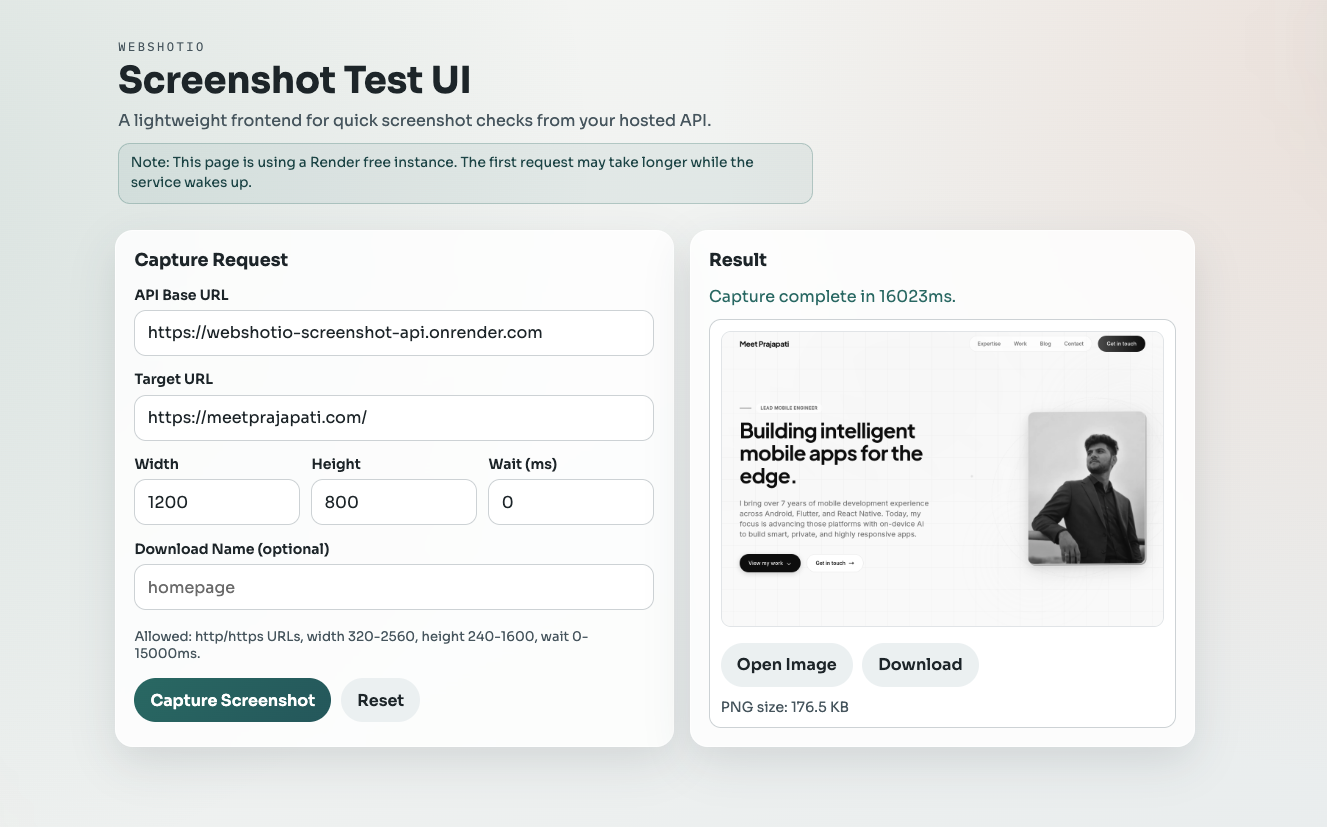
The live UI link is listed in the Webshotio Links section above.
Real-World Use Cases
- Create screenshot previews for shared links
- Capture pages for QA and bug reports
- Generate visual snapshots for client dashboards
- Build screenshot automation for internal tools
Quick Local Setup
npm install
cp .env.example .env
npm start
Then run a quick check:
curl -s -w "\nHTTP %{http_code}\n" http://localhost:3000/health
curl -s -o /tmp/screenshot.png -w "HTTP %{http_code} SIZE %{size_download}\n" "http://localhost:3000/screenshot?url=https://example.com&width=1200&height=800"
Small But Important Notes
Webshotio is designed to be easy, but still includes practical protections for public usage:
- URL checks
- request validation
- rate limiting
- queueing and timeouts
- health and readiness endpoints
So you get a simple developer experience without skipping the basics needed for reliability.
Final Thoughts
If you want a straightforward screenshot API for developers, Webshotio is a solid place to start.
It is simple to try, easy to run locally, and ready to integrate into real projects.
You can find the repo and live test frontend in the Webshotio Links section above.