CliHanger: One macOS Window for Claude Code, Codex, and Other Agent CLIs
CliHanger is an open-source macOS app that groups your coding-agent sessions by project, shows which agent is waiting for you, and traces each listening port back to the session that started it.
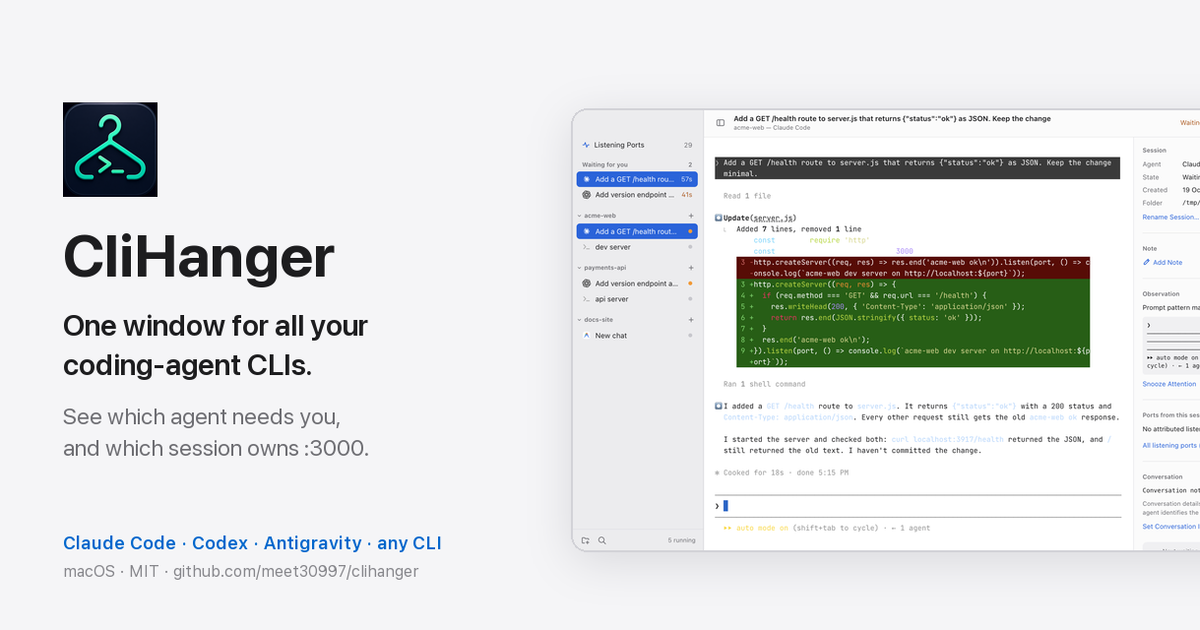
I usually have three to five coding agents running at once: Claude Code in one repo, Codex in another, Antigravity on a docs site, plus a couple of plain terminals running dev servers. Each lives in its own terminal tab, and after an hour the tabs all look the same.
Two things kept costing me time. I couldn't tell which agent was waiting on me without clicking through every tab. And agents left dev servers running after their sessions ended, so I'd hit EADDRINUSE with no idea which forgotten session owned port 3000.
So I built CliHanger, a small macOS app that fixes those two problems and stays out of the way otherwise.
TL;DR: CliHanger puts every agent session in one window, grouped by project. A "Waiting for you" queue lists the agents sitting on a prompt or approval, oldest first. A ports panel shows which session started each listening port, with a Stop button. Sessions run in tmux, so you can always attach from Terminal.app. It's free and MIT-licensed, with a prebuilt download for Apple Silicon.
What CliHanger does
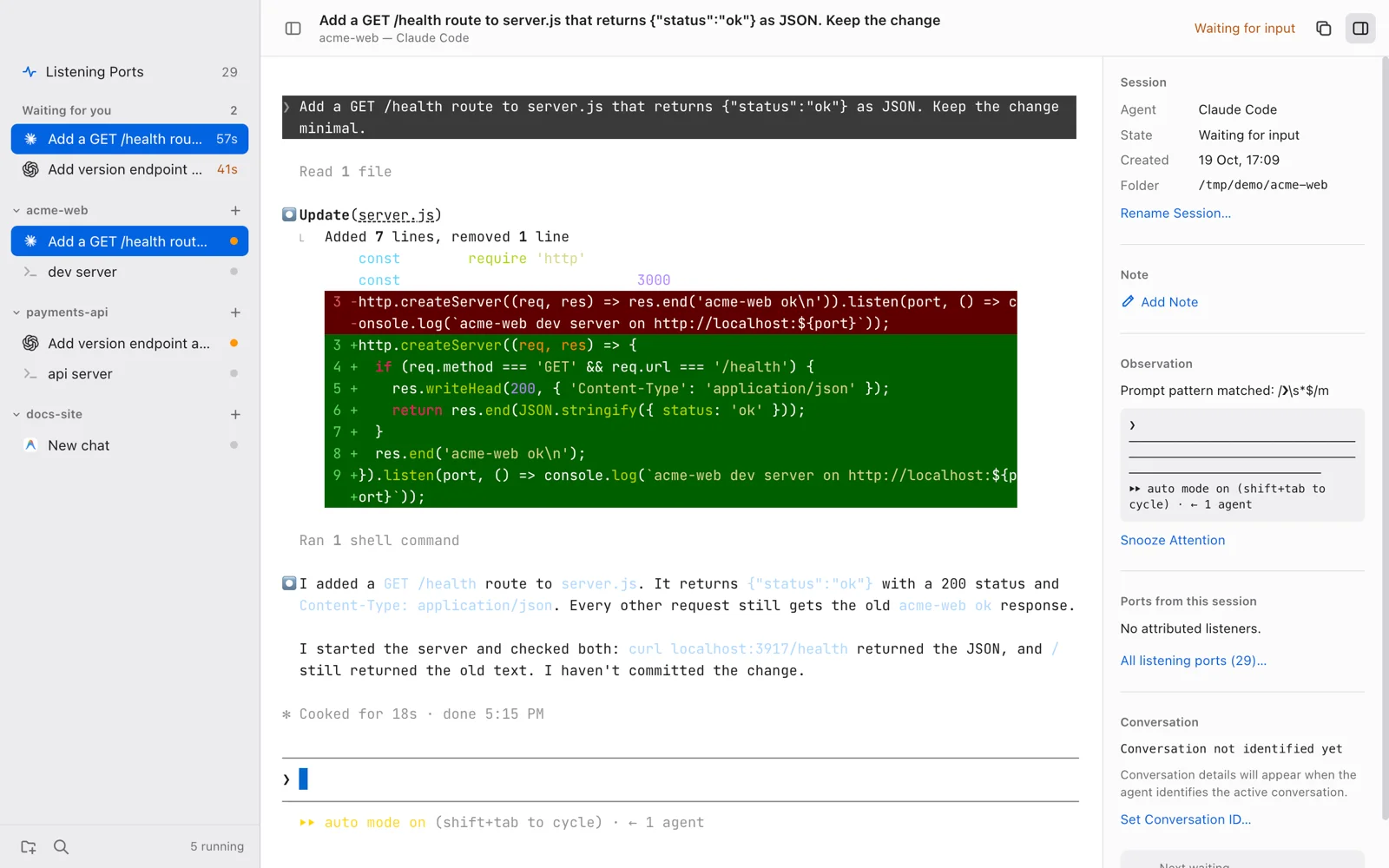
- Sessions grouped by project. Each project folder gets its own group in the sidebar. Start Claude Code, Codex, Antigravity, or a plain shell in it, as many as you like.
- A "Waiting for you" queue. When an agent stops on a question or an approval prompt, it moves into the queue at the top of the sidebar, with a timer showing how long it has waited.
⇧⌘Jjumps to the one that has waited longest. You also get a native macOS notification. - A ports panel. It lists every listening TCP port on your Mac and marks the ones started by a CliHanger session. Each one has a Stop button.
- A quick switcher.
⌘Pjumps to any project or session, with waiting sessions at the top. - Sessions that survive. Closing or reloading the window doesn't stop your agents, and you can park a session and resume the conversation later.
- Agents as JSON. Agent definitions live in
~/.hangar/agents.json. Adding another CLI is a JSON edit, not a code change.
It works with Claude Code, Codex CLI, and Google Antigravity out of the box.
How it works: tmux does the hard part
I didn't want to write a terminal emulator or a process manager. tmux already does both well, so CliHanger is a viewer and launcher on top of it:
CliHanger window
  → xterm.js (renders the terminal)
  → node-pty (a pseudo-terminal)
  → tmux client
  → tmux server on a private socket (tmux -L hangar)
  → claude / codex / agy / your shell
Every session runs in a tmux server on its own socket, named hangar. That has a few nice side effects:
- Your own tmux setup isn't touched. CliHanger uses a separate server with its own config, so it doesn't see your
~/.tmux.confor your other tmux sessions. - Agents outlive the window. If the Electron window reloads or crashes, tmux keeps the agent running and CliHanger picks it back up.
- There's always an escape hatch. You can attach to any session from a normal terminal:
tmux -L hangar list-sessions
tmux -L hangar attach -t <session_name>
The app is built with Electron, using xterm.js and node-pty. I know Electron isn't everyone's favorite. I chose it because xterm.js renders agent TUIs (the box drawing, colors, and live-updating prompts) more reliably than anything else I tried. All the actual work still happens in tmux.
How it knows an agent is waiting for you
This is the part I tuned the most. Every two seconds, CliHanger captures the visible screen of each session from tmux and hashes it.
- The screen changed: the agent is working.
- It stopped changing for about four seconds: CliHanger checks the bottom of the screen against a list of prompt patterns, such as
(y/n), "Do you want to", "Would you like to", "Press enter",1. Yes, or an empty input prompt like❯. - A pattern matches: the session is waiting for input and joins the queue.
- Nothing matches: it's idle.
- The agent has exited and only a shell is left: it's exited.
Waiting for the screen to settle first matters. Without it, a prompt that flashes past during normal output would trigger a false alarm.
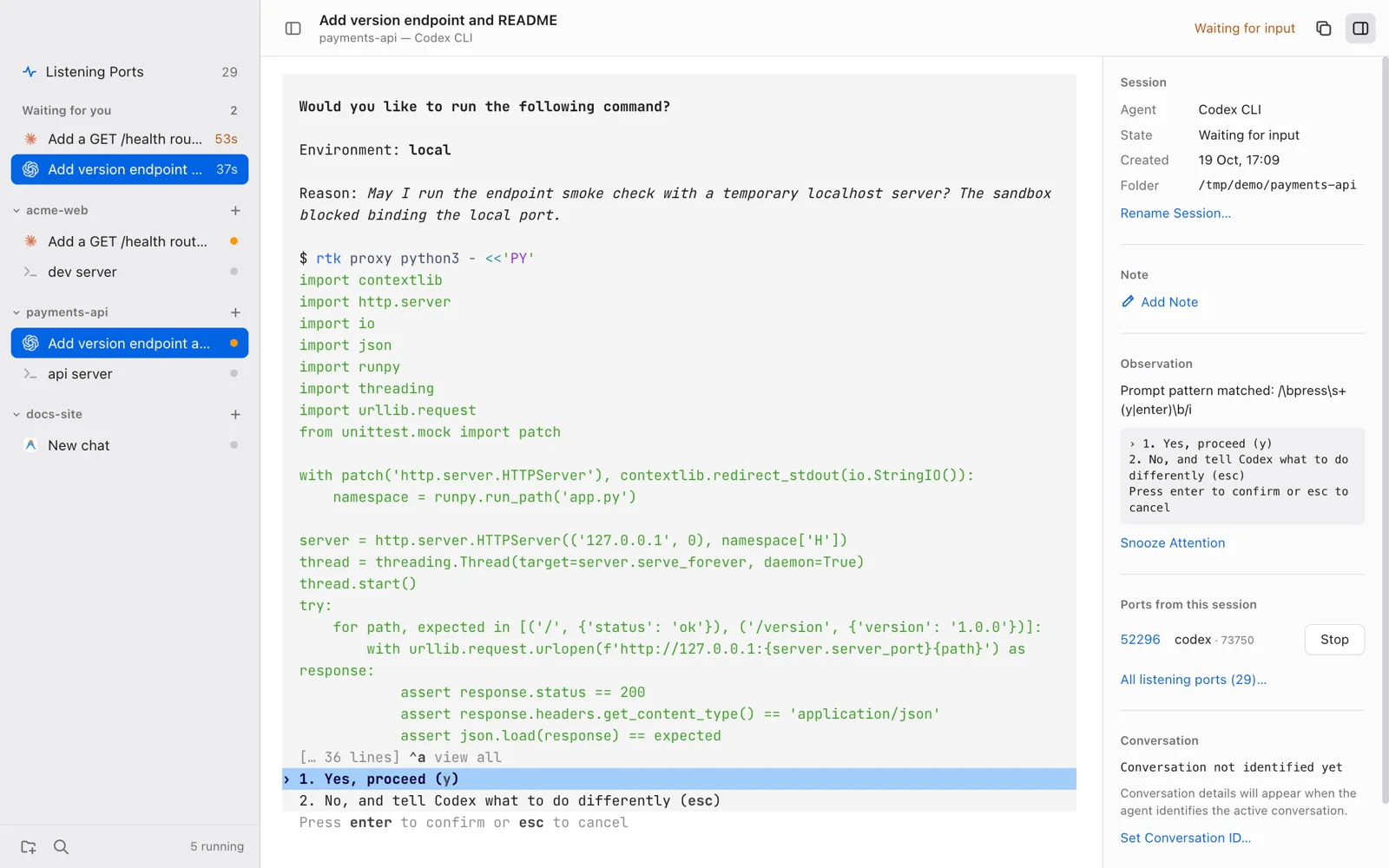
This is a heuristic, and it can be wrong. To make it easy to check, the inspector on the right shows the reason for every status: which pattern matched, and the exact lines it matched on. When it gets one wrong, you can see why right away and add a pattern for it. If a session goes quiet on purpose, you can snooze it.
For agents that support hooks, a small local script can also report status directly to CliHanger. It goes to a receiver that listens only on 127.0.0.1 and requires a token stored in ~/.hangar/hook.token. The receiver can only update the status dot. It can't run anything.
Which session owns port 3000?
The ports panel answers a question that used to take me several minutes: "what is still listening on this port?"
- It runs
lsofto list every listening TCP socket and the process ID that owns it. - It runs
psto get the parent of every process on the Mac. - From each listener, it walks up the parent chain until it reaches the shell of a tmux pane that belongs to a CliHanger session.
If the walk finds a session, the port is attributed to it. The panel shows the project, the agent, and a Stop button. Stop sends SIGTERM, waits two seconds for the process to clean up, then sends SIGKILL if it's still running. CliHanger never kills anything on its own. Only that button does.
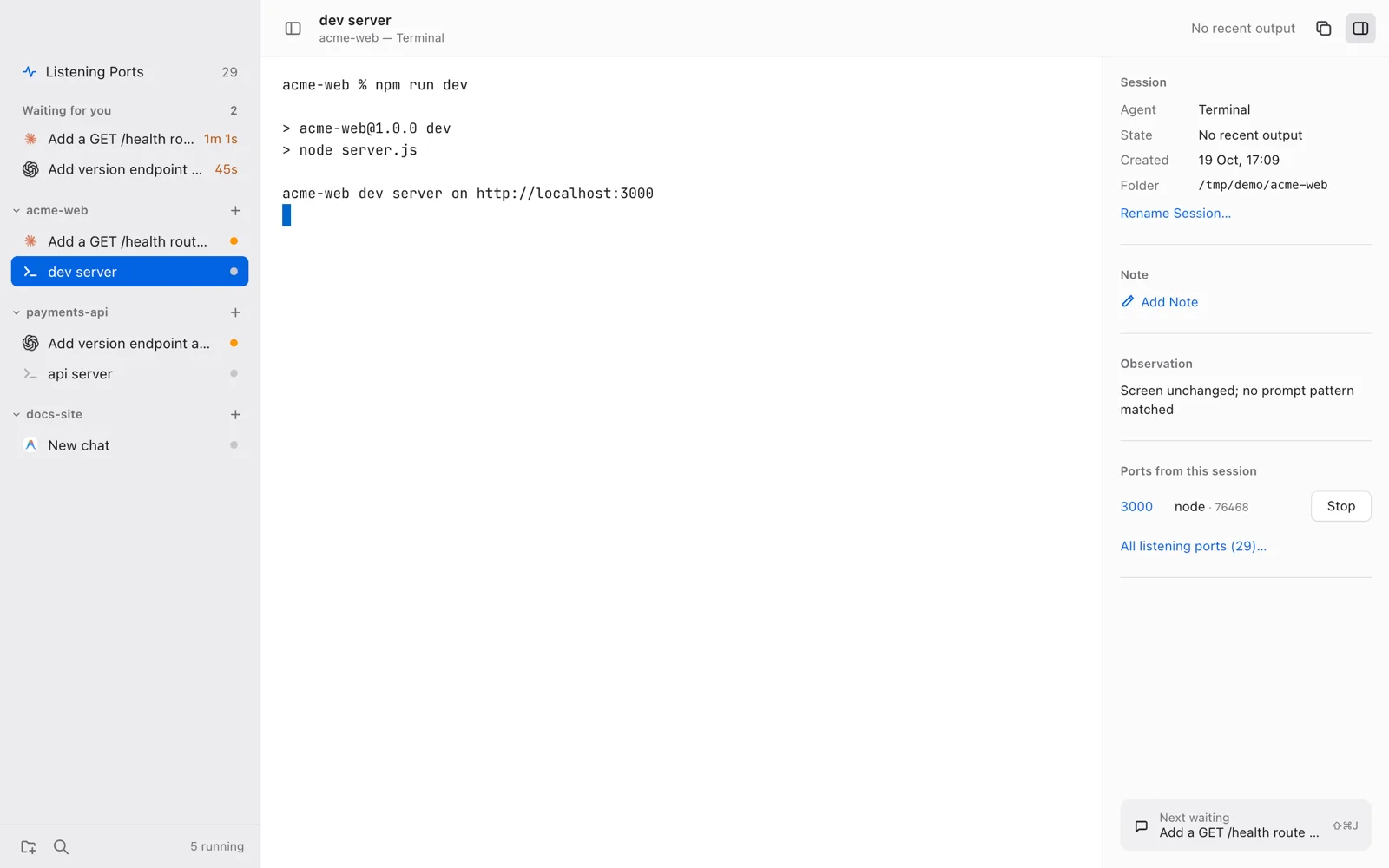
Ports that no session owns are still listed, below the attributed ones, so the panel doubles as a quick "what's running on my Mac" view.
Adding another agent CLI
Agents aren't hardcoded. On first launch, CliHanger copies its defaults into ~/.hangar/agents.json. To add Aider, for example, add one entry and restart the app:
"aider": {
  "label": "Aider",
  "command": "aider",
  "color": "#7c3aed"
}
Status detection works with no extra fields. If a CLI can resume conversations, you can add optional fields that tell CliHanger how. The configuration docs cover them.
What it deliberately doesn't do
I kept the scope small on purpose. CliHanger has no split panes, themes, SSH or remote sessions, settings UI, git client, or token and cost dashboards. tmux, your editor, and the agent vendors already handle those better. (If you want to track Claude Code and Codex usage, I built TokenBar for that.)
Privacy: what it touches on your Mac
CliHanger runs locally, with your normal user permissions:
~/.hangar/holds the agent config, a small state file, the tmux config, and the hook script and token.- A private tmux socket (
hangar) runs all the sessions. - Agent history files (like
~/.claude/projects/) are read, never written, only to find conversation titles and resume targets. - The hook receiver listens only on
127.0.0.1:47823. lsofandpsare run to build the ports panel.
There's no telemetry, no analytics, and no network calls of its own. One thing to know: quitting CliHanger stops every session on its private socket, so finish or park your agents before you quit.
Install CliHanger
You need macOS 12 or later, tmux 3.2 or newer (brew install tmux), and at least one agent CLI that's installed and signed in.
Prebuilt download (Apple Silicon):
- Download
CliHanger-0.1.0-arm64.zipfrom the latest release, unzip it, and moveCliHanger.appto/Applications. - Open it. The app isn't notarized yet, so macOS blocks the first launch:
- macOS 15 or later: go to System Settings → Privacy & Security, find the message about CliHanger, and click Open Anyway.
- macOS 12–14: right-click the app in Finder, choose Open, then Open again.
The release notes list the zip's SHA-256 checksum if you want to verify the download.
Build from source (needed on Intel Macs; requires Node.js 22.12 or newer and the Xcode Command Line Tools):
git clone https://github.com/meet30997/clihanger.git
cd clihanger
npm ci
npm run rebuild
npm start
npm run install-app builds the app and installs it to /Applications.
Current limitations
This is version 0.1, and it started as a tool for my own daily work. Known gaps:
- macOS only, and tested only on Apple Silicon. Intel should work from source but is untested. Linux would need changes to port scanning and packaging.
- Status detection is pattern-based. A CLI that phrases its prompts in an unusual way may show as idle instead of waiting until you add a pattern.
- The download isn't notarized. That needs an Apple Developer ID, which I don't have yet.
- The UI is light mode only.
FAQ
Why not just use tmux or iTerm tabs?
CliHanger is tmux underneath. What it adds is the waiting queue and the port attribution, which tabs don't give you. You can still attach to every session from any terminal.
Does CliHanger work with agents other than Claude Code and Codex?
Yes. Any CLI that runs in a terminal can be added with a few lines in ~/.hangar/agents.json. Antigravity and a plain shell are included by default, and the docs show how to add Aider.
Does it send my code or prompts anywhere?
No. CliHanger has no telemetry and makes no network calls of its own. It reads your agents' local history files only to show conversation titles. Your agents still talk to their own providers as usual.
What happens to my agents if the app crashes?
They keep running in tmux. Reopen CliHanger and it reconnects to them. Quitting the app normally is different: that stops all of its sessions.
Is it free?
Yes. CliHanger is open source under the MIT license.
Try it and tell me what breaks
I'd especially like to hear about two things: status-detection misses with agent CLIs I haven't tested, and dev servers the ports panel fails to attribute. Issues and pull requests are welcome on GitHub.
Related reading
- TokenBar: a macOS usage tracker for Claude Code and OpenAI Codex
- Agent workflows for vibe coding: from idea to product
- llama.cpp on Android: offline AI summarizer benchmarks
I'm Meet Prajapati, a Lead Mobile Engineer who builds small tools for working with AI coding agents. If you have ideas for CliHanger or want to work together, get in touch.